Building Metapaths by OSMNx and City2Graph
This notebook demonstrates how to construct a metapath on a heterogeneous graph using City2Graph.
A metapath defines a composite relation between nodes in a heterogeneous graph, widely used in Graph Neural Networks (GNN).
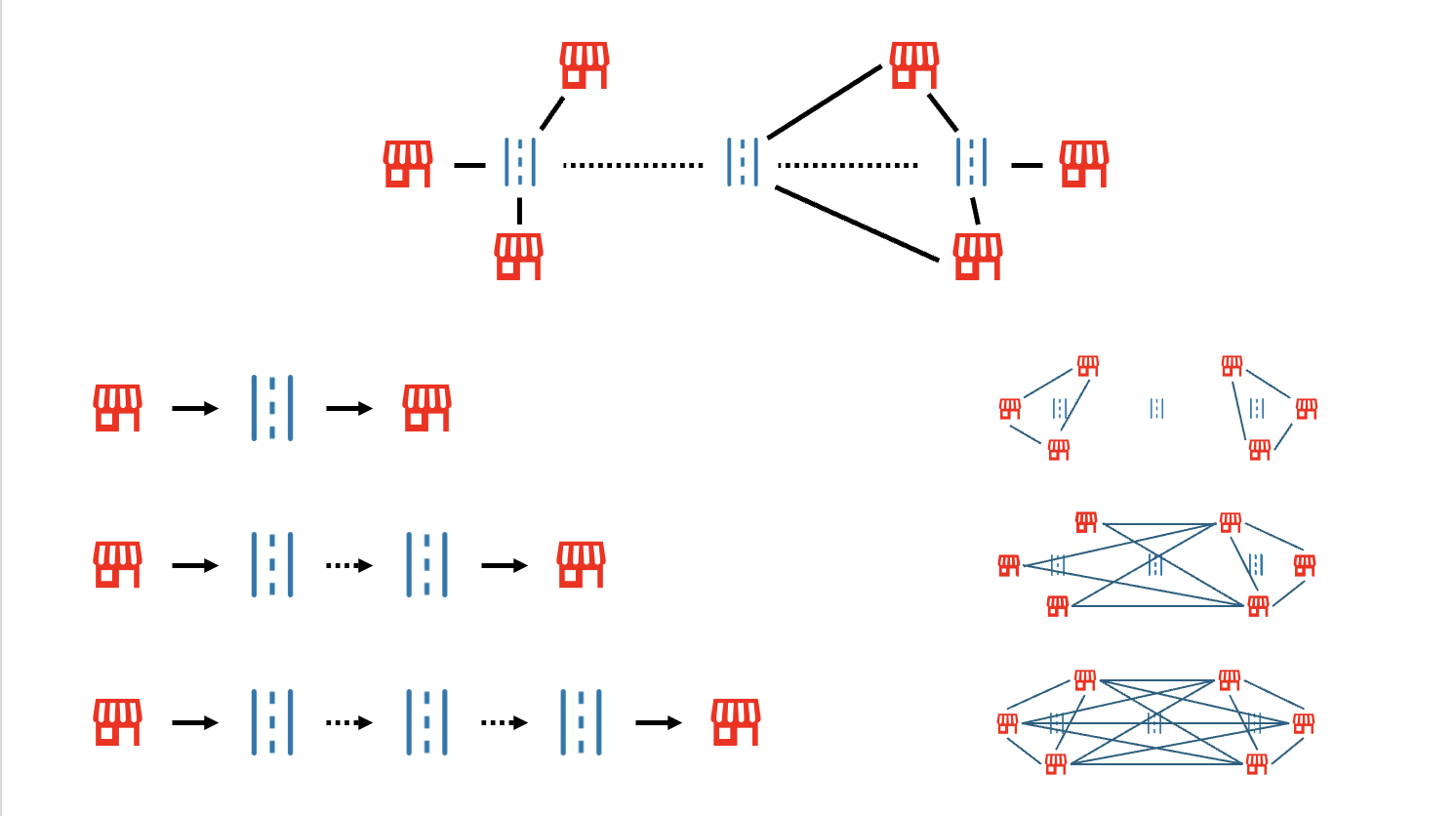
For example, Amenity -> Segment -> Segment -> Amenity connects two amenities if they are accessible via a short walk (two street segments).
We will:
- Fetch Data: Get the street network and amenities for Soho, London using
osmnx(OpenStreetMap). - Construct Graph: Create a dual graph of the streets using
NetworkXconcepts. - Bridge Nodes: Connect amenities to the street network using spatial joins with
GeoPandas. - Add Metapaths: Materialize the
Amenity-Segment-Segment-Amenityrelationship to densify the graph. - Visualization: Visualize the metapaths with an animation.
- Add Metapaths by Weight: Connect amenities based on travel distance for weighted graph analysis.
import geopandas as gpd
import osmnx as ox
import pandas as pd
import matplotlib.pyplot as plt
from matplotlib.lines import Line2D
from matplotlib.animation import FuncAnimation
import city2graph as c2g
0. What is a Metapath in Heterogeneous Graphs?
A metapath is a sequence of relations between node types in a heterogeneous graph. It describes a composite relationship between two nodes and is fundamental for capturing semantic information in Graph Neural Networks (GNN).
For example, in our city graph:
- Amenity (e.g., a Cafe) is connected to a Street Segment (is_nearby).
- Street Segment is connected to another Street Segment (connects_to).
- Street Segment is connected to another Amenity (is_nearby).
This forms the metapath Amenity -> Segment -> Segment -> Amenity, representing that two amenities are within a short walking distance (2 segments) of each other. This structure allows GNNs to learn embeddings based on connectivity patterns.
1. Fetch Data from OpenStreetMap
We download the street network and amenities (cafes, pubs, etc.) for Soho, London. This time we use OpenStreetMap via OSMnx. While City2Graph supports a variety of data sources, it has direct compatibility to OSMnx objects (e.g. c2g.nx_to_gdf(), c2g.dual_graph(), c2g.nx_to_pyg() and many others), making it easy to integrate with existing geospatial workflows.
# Download and project the street network to British National Grid (EPSG:27700) for metric distances
# Data should be obtained from Only in Soho, London
G = ox.graph_from_place(
    "Soho, London",
    network_type="all",
)

street_primary_nodes, street_primary_edges = c2g.nx_to_gdf(G)
street_primary_nodes = street_primary_nodes.to_crs(epsg=27700)
street_primary_edges = street_primary_edges.to_crs(epsg=27700)

amenity_tags = ["cafe", "restaurant", "pub", "bar", "museum", "theatre", "cinema"]
amenity_candidates = ox.features_from_place(
    "Soho, London",
    tags={"amenity": amenity_tags},
).to_crs(epsg=27700)
For the analysis, we clean up the amenities.
# Collapse complex Amenity geometries to points within the projected CRS
amenities = (
    amenity_candidates[["name", "amenity", "geometry"]]
    .copy()
    .explode(index_parts=False)
    .dropna(subset=["geometry"])
)
non_point_mask = ~amenities.geometry.geom_type.isin(["Point"])
amenities.loc[non_point_mask, "geometry"] = amenities.loc[non_point_mask, "geometry"].centroid
amenities = amenities.set_geometry("geometry")
amenities["name"] = amenities["name"].fillna(amenities["amenity"].str.title())
amenities = amenities[~amenities.geometry.is_empty]
amenities = amenities.drop_duplicates(subset="geometry").reset_index(drop=True)
# Display street network data
print("Street Primary Nodes:")
display(street_primary_nodes.head(3))
print("\nStreet Primary Edges:")
display(street_primary_edges.head(3))
print("\nAmenities:")
display(amenities.head(3))
Street Primary Nodes:
| y | x | street_count | geometry | highway | railway | ref | |
|---|---|---|---|---|---|---|---|
| 107324 | 51.515651 | -0.132443 | 4 | POINT (529683.159 181289.359) | NaN | NaN | NaN |
| 107326 | 51.515148 | -0.132727 | 4 | POINT (529664.875 181232.921) | NaN | NaN | NaN |
| 107328 | 51.514837 | -0.132323 | 3 | POINT (529693.803 181199.041) | NaN | NaN | NaN |
Street Primary Edges:
| osmid | highway | maxspeed | name | oneway | reversed | length | geometry | lanes | access | width | tunnel | service | |||
|---|---|---|---|---|---|---|---|---|---|---|---|---|---|---|---|
| 107324 | 12437701118 | 0 | 59207650 | residential | 20 mph | Soho Street | False | False | 8.366709 | LINESTRING (529683.159 181289.359, 529679.695 ... | NaN | NaN | NaN | NaN | NaN |
| 11310505522 | 0 | 395757466 | footway | NaN | NaN | False | False | 6.567612 | LINESTRING (529683.159 181289.359, 529684.78 1... | NaN | NaN | NaN | NaN | NaN | |
| 1694551556 | 0 | 4082521 | residential | 20 mph | Soho Square | True | False | 74.927392 | LINESTRING (529683.159 181289.359, 529706.44 1... | NaN | NaN | NaN | NaN | NaN |
Amenities:
| name | amenity | geometry | |
|---|---|---|---|
| 0 | Curzon Soho | cinema | POINT (529818.965 180959.788) |
| 1 | Pastaio | restaurant | POINT (529233.765 180972.225) |
| 2 | Yauatcha | restaurant | POINT (529498.558 181064.047) |
2. Construct Dual Graph for Street Networks
We convert the primary street graph (intersections as nodes) to a dual graph (streets as nodes). In urban analytics, dual graphs are often better for analyzing connectivity and flow between streets, as edges represent the connections between street segments rather than physical intersections.
street_dual_nodes, street_dual_edges = c2g.dual_graph((street_primary_nodes, street_primary_edges))

street_dual_nodes.geometry = street_dual_nodes.geometry.centroid
# Display dual graph data
print("Street Dual Nodes (Segments):")
display(street_dual_nodes.head(3))
print("\nStreet Dual Edges (Connections):")
display(street_dual_edges.head(3))
Street Dual Nodes (Segments):
| osmid | highway | maxspeed | name | oneway | reversed | length | geometry | lanes | access | width | tunnel | service | |||
|---|---|---|---|---|---|---|---|---|---|---|---|---|---|---|---|
| 107324 | 12437701118 | 0 | 59207650 | residential | 20 mph | Soho Street | False | False | 8.366709 | POINT (529681.427 181293.171) | NaN | NaN | NaN | NaN | NaN |
| 11310505522 | 0 | 395757466 | footway | NaN | NaN | False | False | 6.567612 | POINT (529683.97 181286.175) | NaN | NaN | NaN | NaN | NaN | |
| 1694551556 | 0 | 4082521 | residential | 20 mph | Soho Square | True | False | 74.927392 | POINT (529714.059 181289.894) | NaN | NaN | NaN | NaN | NaN |
Street Dual Edges (Connections):
| geometry | ||
|---|---|---|
| from_edge_id | to_edge_id | |
| (10693880886, 10693880887, 0) | (10693880886, 11815774945, 0) | LINESTRING (529790.105 181134.445, 529782.217 ... |
| (10693880886, 12437444593, 0) | LINESTRING (529790.105 181134.445, 529809.944 ... | |
| (10693880887, 10693880886, 0) | LINESTRING (529790.105 181134.445, 529790.105 ... |
c2g.plot_graph(nodes=street_primary_nodes,
               edges=street_primary_edges)

c2g.plot_graph(nodes=street_dual_nodes,
               edges=street_dual_edges)

3. Bridge Nodes (Connect Amenities)
We attach amenities to their nearest street segment (dual node) using bridge_nodes. This creates a heterogeneous graph with two node types: amenity and segment.
nodes_dict = {
    "amenity": amenities,
    "segment": street_dual_nodes
}

edges_dict = {
    ("segment", "connects_to", "segment"): street_dual_edges
}

# Connect amenities to segments
# bridge_nodes returns the node dictionary and a new dictionary of proximity edges
_, bridged_edges = c2g.bridge_nodes(
    nodes_dict=nodes_dict,
    proximity_method="knn",
    source_node_types=["amenity"],
    target_node_types=["segment"],
    k=1  # Connect to the single nearest segment
)

# Add the street network edges to the edges dictionary
edges_dict.update(bridged_edges)
bridged_edges.keys()
dict_keys([('amenity', 'is_nearby', 'segment')])
bridged_edges[('amenity', 'is_nearby', 'segment')].head(3)
| weight | geometry | ||
|---|---|---|---|
| source | target | ||
| 0 | (12437452142, 12437452112, 0) | 17.075425 | LINESTRING (529818.965 180959.788, 529802.062 ... |
| 1 | (21665930, 25473373, 0) | 7.276304 | LINESTRING (529233.765 180972.225, 529227.711 ... |
| 2 | (11310267304, 11310267309, 0) | 6.238117 | LINESTRING (529498.558 181064.047, 529492.905 ... |
4. Add Metapaths: Materializing Composite Relations
We now define and add the metapath Amenity -> Segment -> Segment -> Segment -> Amenity.
The function add_metapaths takes a sequence of edge types (triplets) and computes the composite edges. It returns the updated graph with new metapath edges. This "materialization" of metapaths explicitly adds edges between amenities that are topologically close, which can significantly improve the performance of graph learning algorithms.
# Define sequence for 1 to 10 street hops
sequence = []
hops = 3
# Start: Amenity -> Segment
sequence = [("amenity", "is_nearby", "segment")]

# Middle: Segment -> Segment (i times)
for _ in range(hops):
    sequence.append(("segment", "connects_to", "segment"))

# End: Segment -> Amenity
sequence.append(("segment", "is_nearby", "amenity"))

print(sequence)
[('amenity', 'is_nearby', 'segment'), ('segment', 'connects_to', 'segment'), ('segment', 'connects_to', 'segment'), ('segment', 'connects_to', 'segment'), ('segment', 'is_nearby', 'amenity')]
# Materialize the metapath edges
result_nodes, result_edges = c2g.add_metapaths(nodes=nodes_dict,
                                               edges=edges_dict,
                                               sequence=sequence,
                                               new_relation_name="is_3_hop_nearby")
for key in result_nodes.keys():
    print(key)
amenity
segment
for key in result_edges.keys():
    print(key)
('segment', 'connects_to', 'segment')
('amenity', 'is_nearby', 'segment')
('amenity', 'is_3_hop_nearby', 'amenity')
print(result_edges[('amenity', 'is_3_hop_nearby', 'amenity')].head(3))
               weight                                           geometry
source source
1      305          1  LINESTRING (529233.765 180972.225, 529228.454 ...
       161          1  LINESTRING (529233.765 180972.225, 529277.738 ...
       417          7  LINESTRING (529233.765 180972.225, 529245.603 ...
5. Visualization of Metapath Connections
Let's visualize the connections. We'll pick a random amenity and show which other amenities are reachable via this metapath. Visualizing these connections helps verify the graph structure and understand the reachability of amenities within the street network.
# Visualize the graph with metapaths
# We want to highlight the metapath connections
# Plot
c2g.plot_graph(
    nodes=result_nodes,
    edges=result_edges,
    node_color={
        "amenity": "red",
        "segment": "gray"
    },
    node_zorder={
        "amenity": 3,
        "segment": 1
    },
    node_alpha={
        "amenity": 1.0,
        "segment": 0.5
    },
    markersize={
        "amenity": 50,
        "segment": 5
    },
    edge_color={
        ("segment", "connects_to", "segment"): "gray",
        ("amenity", "is_nearby", "segment"): "gray",
        ("amenity", "is_3_hop_nearby", "amenity"): "cyan",
    },
    edge_zorder={
        ("segment", "connects_to", "segment"): 3,
        ("amenity", "is_nearby", "segment"): 1
    },
    edge_linewidth={
        ("segment", "connects_to", "segment"): 0.5,
        ("amenity", "is_nearby", "segment"): 0.5,
        ("amenity", "is_3_hop_nearby", "amenity"): 2.0,
    },
    bgcolor="black",
    legend_position="lower right",
    subplots=False
)

6. Add Metapaths by Weight: Distance-Based Connectivity
Alternatively, we can connect amenities based on a weight threshold (e.g., distance or time) using add_metapaths_by_weight. This uses Dijkstra's algorithm to find all reachable nodes within a specified limit and edge types.
nodes_dict = {
    "amenity": amenities,
    "intersection": street_primary_nodes
}

edges_dict = {
    ("intersection", "connects_to", "intersection"): street_primary_edges
}

_, bridged_edges = c2g.bridge_nodes(
    nodes_dict=nodes_dict,
    proximity_method="knn",
    source_node_types=["amenity"],
    target_node_types=["intersection"],
    k=1
)

edges_dict.update(bridged_edges)

# set travel time in seconds assuming average walking speed of 4 km/h
walking_speed_kmh = 4
walking_speed_mps = walking_speed_kmh * 1000 / 3600  # convert km/h to m/s

# Add travel time attribute to edges
for edge_type, edge_gdf in edges_dict.items():
    edges_dict[edge_type]["travel_time_sec"] = edge_gdf.length / walking_speed_mps
In this case, endpoint is specified as amenity. Between each amenity across the edge types, metapaths are calculated by the threshold 60 of accumulative weight by travel_time_sec.
# Connect amenities within 500 meters walking distance
weight_nodes, weight_edges = c2g.add_metapaths_by_weight(
    nodes=nodes_dict,
    edges=edges_dict,
    weight="travel_time_sec",
    threshold=60,
    new_relation_name="is_within_1_min",
    endpoint_type="amenity",
    directed=False
)
c2g.plot_graph(
    nodes=weight_nodes,
    edges=weight_edges,
    node_color={
        "amenity": "red",
        "intersection": "gray"
    },
    node_zorder={
        "amenity": 3,
        "intersection": 1
    },
    node_alpha={
        "amenity": 1.0,
        "intersection": 0.5
    },
    markersize={
        "amenity": 50,
        "intersection": 5
    },
    edge_color={
        ("intersection", "connects_to", "intersection"): "gray",
        ("amenity", "is_nearby", "intersection"): "gray",
        ("amenity", "is_within_1_min", "amenity"): "cyan"
    },
    edge_zorder={
        ("intersection", "connects_to", "intersection"): 1,
        ("amenity", "is_nearby", "intersection"): 1,
        ("amenity", "is_within_1_min", "amenity"): 2
    },
    edge_linewidth={
        ("intersection", "connects_to", "intersection"): 0.5,
        ("amenity", "is_nearby", "intersection"): 0.5,
        ("amenity", "is_within_1_min", "amenity"): 2.0
    },
    bgcolor="black",
    title="Metapaths by Weight (Travel Time < 1 min)",
    legend_position="lower right",
    subplots=False
)
